
Editing a draft note is easy, you can find a draft note two ways to continue editing
- Under ‘My Tasks’, or
- Locate note in Patients Timeline
To Edit
- Tap on the Clinical Note
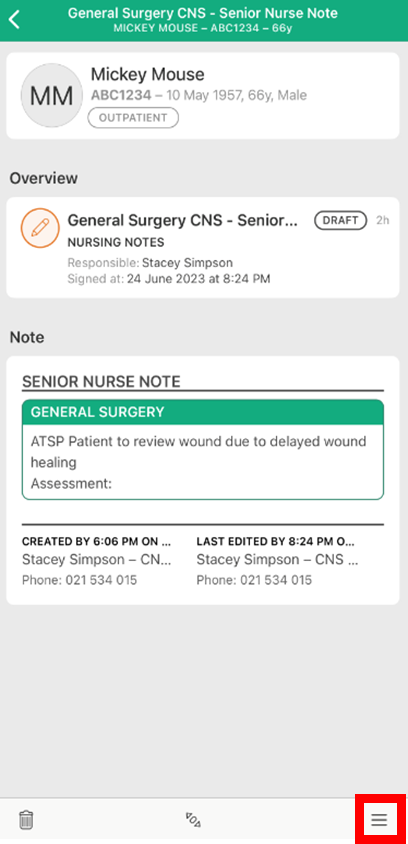
- Tap the action button on the bottom right of the screen
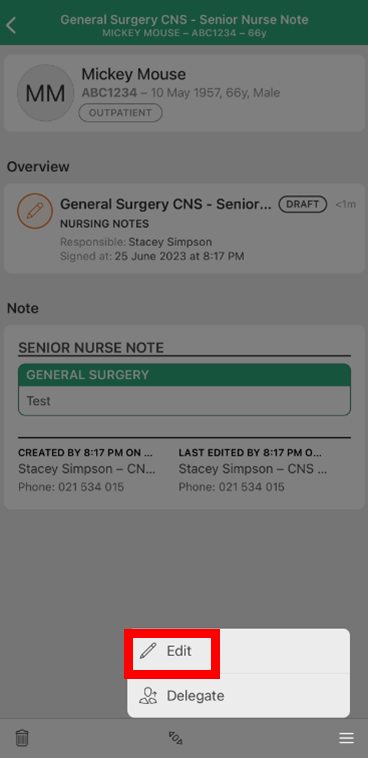
- Tap on 'Edit'
- The Clinical Note will then reload and you'll be able to make any edits
Notes:
- You can re-edit a draft as many times as required. Once a Clinical Note is signed however, you can only addend the note or rescind it.
- A draft note can also be delegated to another user, or another user can take ownership of the note if it remains in draft. Situations where this may occur are when another clinician takes over care of the patient (e.g. Medical Admission Note, Nursing Handover) or to complete the double signing process for students and supervising clinicians.